- English



- English
- What's Myforex
- Share
- Use tools
- Get information
- What's New
- Help center
- About us
- Customer support
- Terms and policies


-

-
 PortfolioShare your portfolio and performance in real time
 -
 ContestsContests held by retail brokers around the world
-
-
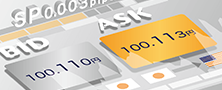 Real-time spread comparisonCompare spreads of major retail brokers in real time
 -
 Volatility analysisVisualize volatility as a measure of daily market activity
 -
 Swap point comparisonCompare buy and sell swap values for each broker by symbol
 -
 Market rates & chartsCheck prices for all instruments offered by each broker
 -
 IndicatorsProviding in-house developed indicators for MT4/MT5
 -
 Trading calculatorsCalculation tools for each broker to help you trade


Search results
280 Search results
Show:
Total: 280
Show:
-
Historical Strength Graph
The Historical Strength Graph displays the strengths of eight major currencies in a line chart. The calculation and display periods can be customized.
See details
-
Scheduled system maintenance
We will be performing system maintenance on November 22, 2025, from 1 pm to 1:15 pm (UTC). During this time, some web pages will be unavailable.
See details
-
MT4/MT5: Modify EA/indicator settings
On MetaTrader 4 (MT4) / MetaTrader 5 (MT5), you can customize the settings of Expert Advisors (EAs) and indicators applied to charts, supporting your trading strategy or visual preferences.
See details
-
Release of the Showcase Feature
We are pleased to announce that the Showcase feature has been added to the Portfolio. This new feature allows you to present your portfolios with descriptions and social links.
See details
-
MT4/MT5: Compile EA/indicator
In MetaTrader 4 (MT4) / MetaTrader 5 (MT5), you need to compile the EA/indicator source code before running it. Here we will look at how to compile EAs and indicators on MT4/MT5.
See details
-
MT4/MT5: Create or load EA/indicator settings file
In MetaTrader 4 (MT4) and MetaTrader 5 (MT5), you can create or load a settings file to save and reuse your customized parameters. This helps save time each time you apply EAs and indicators to a chart.
See details
-
Troubleshoot MT4/MT5 freezing issues
MetaTrader 4 (MT4) / MetaTrader 5 (MT5) may freeze or become unresponsive for various reasons. Below are some potential causes and suggested solutions.
See details
-
MT4/MT5: Display countdown to next bar
Here we'll look over the steps on how to display the countdown to the next bar in MetaTrader4 (MT4) / MetaTrader5 (MT5) app for Android and iOS devices. By tracking the time until the next bar, you'll know when the current one ends, helping you decide the best times to enter or exit trades.
See details
-
MT4/MT5: Lock or hide objects
Here we'll look over the steps on how to lock or hide objects in MetaTrader4 (MT4) / MetaTrader5 (MT5) app for Android and iOS devices. Locking an object prevents it from being accidentally moved or deleted. You can also hide objects to improve chart visibility.
See details
-
New Brokers Added to Portfolio
We are pleased to announce the addition of seven new brokers to our Portfolio service.
See details
-
Unlimited Trading Accounts Now Available in Portfolio
We are pleased to share that the limit on the number of trading accounts in your Portfolio has been removed.
See details
-
MT4/MT5: Add space on the right side of chart
Here we'll look over the steps on how to add a space on the right side of the chart in MetaTrader4 (MT4) / MetaTrader5 (MT5) app for Android and iOS devices. Extra chart space makes bars and indicators easier to see.
See details
-
MT4/MT5: Resize the sub-window
Here we'll look over the steps on how to change the size of sub-windows in MetaTrader4 (MT4) / MetaTrader5 (MT5) app for Android and iOS devices. Adjusting sub-window sizes helps improve indicator visibility and achieve a more balanced chart layout.
See details
-
MT4/MT5: Create a trading report
Here we'll look over the steps on how to create a trading report in MetaTrader4 (MT4) / MetaTrader5 (MT5) app for iOS devices. You can review your past trading performance for any period by generating trading reports.
See details
-
Launch of Login Notifications and Enhanced Unauthorized Login Prevention
We are pleased to announce the launch of login notifications and enhanced unauthorized login prevention in our Client Manager, ensuring a secure and seamless user experience.
See details
-
Scheduled system maintenance
We will be performing system maintenance on May 21, 2025, from 4 am to 4:30 am (UTC). During this time, the Client Manager will be unavailable.
See details
-
Axi
Axi, a forex broker established in 2007, offers traders extensive support with key features such as Axi Select, copy trading, and an automated chart analysis tool.
See details
-
Passkey Authentication Introduction and Scheduled Maintenance
We are pleased to announce the introduction of Passkey Authentication at Myforex. With this update, users will be able to log in using authentication methods such as fingerprint recognition and other credentials stored on their devices. In connection with this change, system maintenance will be conducted on March 19.
See details
-
Email Authentication Introduction and Scheduled Maintenance
We are pleased to announce that Myforex will be introducing Email Authentication as a seamless and secure method to enhance user experience.
See details
-
System Maintenance Completion
We would like to inform you that the system maintenance, which began at 01:30 AM (UTC) on Wednesday, November 13, 2024, has been completed.
See details

Disclaimer:
All information and content provided on this website is provided for informational purposes only and is not intended to solicit any investment. Although all efforts are made in order to ensure that the information is correct, no guarantee is provided for the accuracy of any content on this website. Any decision made shall be the responsibility of the investor and Myforex does not take any responsibility whatsoever regarding the use of any information provided herein.
The content provided on this website belongs to Myforex and, where stated, the relevant licensors. All rights are reserved by Myforex and the relevant licensors, and no content of this website, whether in full or in part, shall be copied or displayed elsewhere without the explicit written permission of the relevant copyright holder. If you wish to use any part of the content provided on this website, please ensure that you contact Myforex.



Myforex uses cookies to improve the convenience and functionality of this website. This website may include cookies not only by us but also by third parties (advertisers, log analysts, etc.) for the purpose of tracking the activities of users. Cookie policy